Homework: Connect Four
- Assigned
-
- February 12, 2026
- Due
-
- February 26, 2026 10:00pm
- Collaboration
-
-
Regular policies for collaboration apply to this homework assignment.
Make sure you review and understand the policies on the syllabus before you discuss your work on this assignment with anyone else.
- Submitting
-
-
Submit your completed
game.csource file on Gradescope. You can submit as many times as you want up until the deadline. Make sure the final version of your implementation is committed and pushed to yourgitrepository by the deadline.
Your task for this assignment is to implement a two player Connect Four game. The sections below outline the rules for the game you’ll be implementing, what you’ll need to get started on the assignment, and how your work will be assessed.
Rules
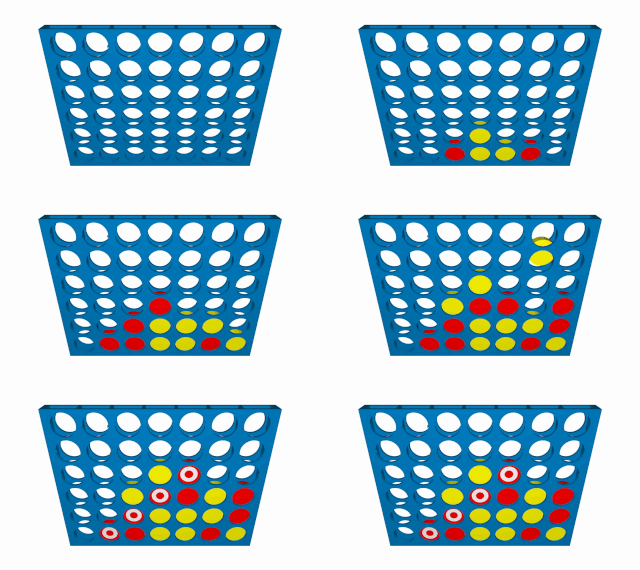
Connect Four is a two player turn-based game with some similarities to tic-tac-toe. The game is played on a grid with seven columns and six rows. Each player has tokens that are all the same color; the first player to move uses yellow tokens, and the second player uses red tokens. A player wins by placing four of their tokens in a row, column, or diagonal. Each player takes a turn by dropping a token into one of the seven columns, but the board stands vertically so tokens will drop to the lowest open space in the chosen column
The animation below, originally from Wikipedia, shows a sequence of moves in a Connect Four game ending in a win for red:
There are a few important cases you’ll need to worry about in your implementation:
- Players cannot add tokens to a column that is full. You will need to reject any attempts by a player to add a token to a full column.
- A player wins when they get four tokens in a straight vertical, horizontal, or diagonal line. Diagonal lines must be “straight,” meaning the tokens in adjacent columns must be exactly one row apart.
- The game ends when a player wins, or when the board has completely filled without a winner.
Your Task
Implement the two-player connect four game described above. There are some specific requirements for the game implementation described below, so make sure you read them carefully before starting your work.
You must complete your work for this assignment using a git repository on the class git server.
When you log in you should see a repository called connect-four-USERNAME, where USERNAME is your college username.
You have access to modify this repository directly, so do not create a fork.
Instead, run the commands below to clone the repository and open it with VSCode:
$ cd ~/csc161/homework
$ git clone git@git.cs.grinnell.edu:csc161/connect-four-USERNAME.git connect-four
$ cd connect-four
$ code .
Make sure you replace USERNAME in the example above with your Grinnell username (not your full email address) so you have the correct repository path.
Notice that this time we are using git clone with an extra option at the end.
This tells git to save the cloned repository in a directory named connect-four instead of connect-four-USERNAME.
If you are unable to access your git repository, please contact the instructor immediately!
The repository could be configured incorrectly, but you may also have an issue with the configuration of your user account on the git server that we should address as soon as possible.
Building and Running the Game
The starter code includes a Makefile, so you can compile the code by running make:
$ make
clang -g -Wall -o game game.c
The game implementation is in game.c and is compiled to a program named game.
Run the game with the command ./game:
$ ./game
Requirement: Representing Game State
You are required to use a one-dimensional array to complete this homework assignment. You may be tempted to use a 2D array given the fact that the board is a grid, 2D arrays are not allowed for this assignment. Your game board representation must include all the cells of the board in a single array; you are not allowed to use separate arrays for each row or column of the board.
You are free to decide how you map elements of the array to cells in the game board, but I recommend using row major order as we did in the tic-tac-toe labs.
You are also free to decide what type of value you use to represent a cell on the game board.
There are several reasonable choices, but I recommend using an enum type.
Requirement: Displaying the Game State
When you display your board, you should print it in the format shown below:
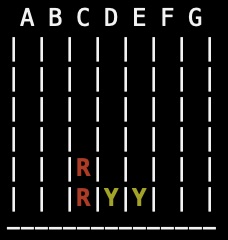
This display shows two tokens from each player indicated by “R” and “Y”, but also displayed in color. The starter code for this assignment includes examples of how you can print to the terminal in these colors. Notice that the columns are labeled with single letters. Users will type these letters to submit their move each turn.
The string constants we use to display in color are difficult to understand. We’ll do more with terminal colors in our next assignment, but we will have a library that handles the confusing constants for us so we can just ask for specific colors by name.
You might end up with a terminal that prints everything in bold red or yellow text, especially if your game crashes while you are testing it.
If that happens, you can run the reset command to clear the screen and reset terminal colors:
$ reset
Grading
There are some specific requirements so please review the grading information below so you understand how your work will be assessed.
This assignment will have a maximum possible score of 100 points. The points will be assigned as follows:
- Game Rules, State, and Interface: 40 points
- You must correctly implement all of the game rules described above. Your implementation must meet the requirements for representing and displaying game state. You will still need to make decisions about how you represent some aspects of the game state, messages you display to the user, and other aspects of the game implementation. Just make sure your decisions about these unspecified details follow the requirements above.
- Input Validation: 15 points
- Your program must gracefully handle invalid user input, repeatedly prompting the user for responses until they give a valid response. We have been somewhat lenient about input checking in prior work, but this implementation must reject all invalid inputs.
- Code Style: 15 points
- Your implementation must follow all of the code style requirements for the class as of the time the assignment was released.
Submissions that build with compiler errors or warnings will receive an automatic zero for this part of the assignment.
There may be further deductions in other categories depending on the errors or warnings.
Note: Because of the late release, there may be some updates to code style requirements during the assignment period. Some updated style requirements may apply to the assignment, but the code style requirements will not change during the last five days the assignment is out. - Functions: 15 points
- Your code must be organized into functions with a clear, sensible purpose. Your implementation should not have any unreasonably large or complex functions. If you are unsure about whether or not a function is too large or complex you can ask the instructor for feedback on your design.
- Safety: 15 points
- Your program must not rely on unsafe or undefined behavior. You should never read from uninitialized variables. If you use pointers or arrays in your implementation these must be used safely; your program should never access beyond the bounds of an array, and should not access storage locations after they go out of scope (e.g. do not return pointers to a function’s local variables). Unsafe code may cause your program to crash, but there will be a deduction in this category even if the program appears to work correctly.
Class Concepts
You can complete this entire assignment using concepts we’ve covered in class as of the assignment’s release, but you may find it helpful to incorporate material we cover in class after the assignment is released. You are welcome to use concepts covered in class during the assignment period, but you may not use any C features we have not discussed before the assignment deadline. Using concepts we haven’t covered by the time you turn in your work will result in a grade deduction.
Late Work
The course syllabus has been updated with the late policy for homework assignments. To quickly summarize, you can submit up to one week after the scheduled deadline. Any work submitted after the deadline will receive an automatic 20% late penalty.
As a default, we will grade the last version of an assignment that you submit on Gradescope. That means we will grade your late work even if it was preceded by earlier versions submitted before the deadline. If you decide you’d prefer that we grade the earlier version of your work we can make that change as long as we haven’t started grading the assignment yet.
Academic Honesty
As with all work you do in this course, the academic honesty policy applies to your work on this homework assignment. Please review the syllabus for policies on individual homework to make sure you understand the resources you can and cannot use for this work. Academic honesty violations will be reported to the committee on academic standing, and can result in penalties for your grade on this assignment or the entire course if you are found responsible for the violation.
Copyright © Charlie Curtsinger
 This work is licensed under a Creative Commons Attribution-NonCommercial-ShareAlike 4.0 International License.
Materials for this course are derived from work by Charlie Curtsinger, Nicole Eikmeier, Fernanda Eliott, Barbara Johnson, Titus Klinge, Peter-Michael Osera, Sam Rebelsky, John Stone, Henry Walker, and Jerod Weinman.
This website was built using Jekyll, Twitter Bootstrap, and the Bootswatch Cosmo Theme.